
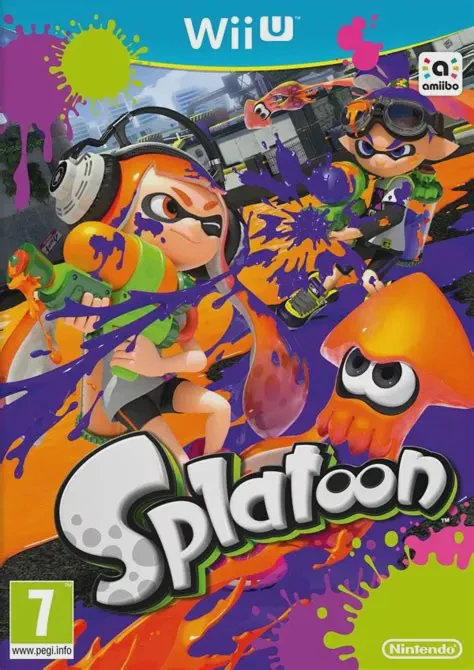
Splatoon
Game Description
Game Overview
Splatoon is an acclaimed third-person action shooter developed and published by Nintendo for the Wii U. The game introduces players to Inkopolis, a bustling metropolis populated by fashion-conscious Inklings who participate in competitive sports known as Turf Wars.
Unlike traditional shooters focused solely on eliminations, victory in Splatoon relies on controlling territory. Players spread ink across floors and walls while managing their Ink Tank. Transforming into squid form grants high-speed movement through friendly ink, passive health regeneration, and stealth capabilities, but stepping onto enemy ink slows movement down and inflicts continuous damage.
Beyond the competitive online modes, Splatoon features "Octo Valley," a single-player story campaign where players aid Cap'n Cuttlefish in retrieving the Great Zapfish from the nefarious Octarian army. Featuring innovative motion controls via the Wii U GamePad, deep gear customization options, and an infectious original soundtrack, Splatoon established itself as one of the Wii U's defining flagship titles.
Quick Specifications
Feature | Details |
Title | Splatoon |
Platform | Nintendo Wii U |
Developer | Nintendo EAD |
Publisher | Nintendo |
Genre | Third-Person Shooter / Action |
Release Date | May 2015 |
Game Modes | Single-player, 2-Player Local / 8-Player Online Multiplayer |
Input Support | Wii U GamePad (Required for Motion Aiming & Radar), Wii U Pro Controller |
Download Size | ~1.8 GB |
Key Features
Territory Control Combat: Claim victory by covering the highest percentage of the arena map with your team's colored ink before the timer runs out.
Squid Transformation Mechanics: Seamlessly morph between human form to shoot ink and squid form to swim through ink, submerge past hazards, and reload ammunition.
Diverse Weapon Arsenals: Equipping Main, Sub, and Special weapons allows players to adapt across close-range Splat Rollers, versatile Shooters, and precision Splatchargers.
Wii U GamePad Map Integration: Use the touchscreen GamePad to monitor real-time map coverage and tap teammate icons to Super Jump across the battlefield instantly.
Octo Valley Single-Player Campaign: Tackle creative platforming challenges, defeat Octarian forces, and overcome massive boss encounters in a full offline campaign.
Frequently Asked Questions (Q&A)
Q: How does the Wii U GamePad touchscreen function during online matches?
A: The GamePad displays a real-time overhead map showing current ink coverage across the arena. Tapping a teammate's icon on the screen allows your Inkling to perform a Super Jump directly to their location.
Q: Are motion controls mandatory for aiming in Splatoon?
A: No, while gyro motion controls using the Wii U GamePad are enabled by default for precise camera aiming, players can turn off motion controls in the settings menu and use traditional dual-analog stick controls instead.
Q: Can two players play together locally on a single Wii U console?
A: Yes, Splatoon includes a local two-player mode called Battle Dojo, where one player views gameplay on the Wii U GamePad screen while the second player uses the TV screen with a Wii U Pro Controller or Classic Controller to pop targets.
Q: What benefit does upgrading headgear, clothing, and shoes provide?
A: Gear purchased in Inkopolis shops features primary and secondary ability slots that grant passive gameplay buffs, such as faster ink recovery, increased movement speed, reduced damage, or lower sub-weapon ink consumption.
Download Resources
Click the links below to go to the cloud drive download page
⚠️ Download Tips:
- Use extraction software (e.g., 7-Zip, WinRAR) to extract the downloaded files
- Put the extracted ISO or CSO files into the ISO folder of your PSP memory card
- Make sure your PSP has custom firmware (CFW) installed